This documentation is available as Markdown for AI agents and LLMs. See the full Markdown index or append .md to any documentation URL.
Introduction to EAS Workflows
Edit page
EAS Workflows is a CI/CD service for automating builds, updates, submissions, and tests for React Native and Expo apps.
EAS Workflows is a CI/CD service from EAS (Expo Application Services) that automates repeated tasks like building Android and iOS binaries, publishing over-the-air updates, submitting to app stores, running E2E tests, and deploying web apps to EAS Hosting.
EAS Workflows run in managed cloud environments with pre-packaged job types designed specifically for mobile app development. When your EAS project is linked to GitHub, teams can trigger workflows from GitHub events (push, pull request, labels) or schedules (cron), or run them manually via the EAS CLI.
Learn how to automate some of the most common processes that every app development team must tackle: creating development builds, publishing preview updates, and deploying to production.
Quick start
The
eascommands below require EAS CLI. See How to install EAS CLI for more information.
To create your first workflow, run the following command and follow the prompts:
Get started
Workflows are defined as YAML files in the .eas/workflows/ directory at the root of your project. Each file specifies a name, optional triggers (on), and one or more jobs that run in the cloud. The Get started guide walks you through the prerequisites and your first workflow run:
Set up your project and create development builds with a workflow.
Expo Skills for AI agents
If you use an AI agent, install Expo Skills to teach it how to write and debug workflow YAML files:
Helps understand and write EAS workflow YAML files for Expo projects.
Key features
- Pre-packaged jobs: Ready-to-use jobs that build, submit, and update your app, run Maestro E2E tests, send Slack messages, and more. Custom jobs run any command you need.
- Flexible triggers: Run workflows on GitHub events (push, pull request, label, branch or tag deletion), on a cron schedule, on App Store Connect events, manually with
eas workflow:run, or from the REST API. - No infrastructure to manage: Jobs run on EAS-hosted macOS and Linux workers, so you don't need to maintain CI servers or configure Android Studio and Xcode.
- Everything on one dashboard: Builds, updates, test results, artifacts, and logs all appear on expo.dev.
- Faster releases: Combine
fingerprint,get-build, andupdatejobs to skip redundant native builds and publish over-the-air updates when possible.
When to use EAS Workflows
Frequently asked questions (FAQ)
How do workflows compare to other CI services?
EAS Workflows are designed to help you and your team release your app. It comes preconfigured with pre-packaged job types that can build, submit, update, run Maestro tests, and more. All job types run on EAS, so you'll only have to manage one set of YAML files, and all the artifacts from your job runs will appear on expo.dev.
Other CI services, like CircleCI and GitHub Actions, are more generalized and have the ability to do more than workflows. However, those services also require you to understand more about the implementation of each job. While that is necessary in some cases, workflows help you get common tasks done quickly by pre-packaging the most essential types of jobs for app developers. In addition, workflows are designed to provide you with the fastest possible cloud machine for the task at hand, and we're constantly updating those for you.
EAS Workflows are great for operations related to your Expo apps, while other CI/CD services will provide a better experience for other types of workflows.
Can I trigger a workflow without GitHub?
Yes. Any workflow can be run manually using eas workflow:run regardless of the on trigger configuration. You can also use scheduled triggers with cron syntax.
What cloud machines do workflows run on?
Workflows run on EAS's managed infrastructure:
- Linux workers:
linux-medium(4 vCPU, 16 GB RAM) orlinux-large(8 vCPU, 32 GB RAM) - Linux with nested virtualization for Android emulators:
linux-medium-nested-virtualizationorlinux-large-nested-virtualization - macOS workers for iOS builds and simulators:
macos-medium(5 cores, 20 GB RAM) ormacos-large(10 cores, 40 GB RAM)
Can workflows run jobs in parallel?
Yes. Jobs without dependencies run in parallel by default.
Use needs to specify that a job should wait for another job to succeed, or after to wait for a job to complete regardless of success or failure.
Can I use environment variables in workflows?
Yes. Workflows support EAS environment variables and inline env values. Environment variables can be referenced using ${{ env.VARIABLE_NAME }} syntax.
What are the current limitations?
No shared workflow configurations (each workflow must be defined independently), and no matrix builds (cannot run multiple variations with different configurations in parallel). See Limitations for more details and updates.
Can I run custom scripts in a workflow?
Yes. Custom jobs with steps let you run shell commands, use built-in functions like eas/checkout and eas/install_node_modules, and set outputs for downstream jobs.
Does EAS Workflows work with existing React Native projects?
Yes. EAS Workflows works with both CNG (Continuous Native Generation) and existing React Native projects, as long as the project is configured for EAS Build.
Considering EAS Workflows? Share the following slide in your next team meeting
Share the following slide in your next team meeting to discuss what EAS Workflows are and how they can help your team:
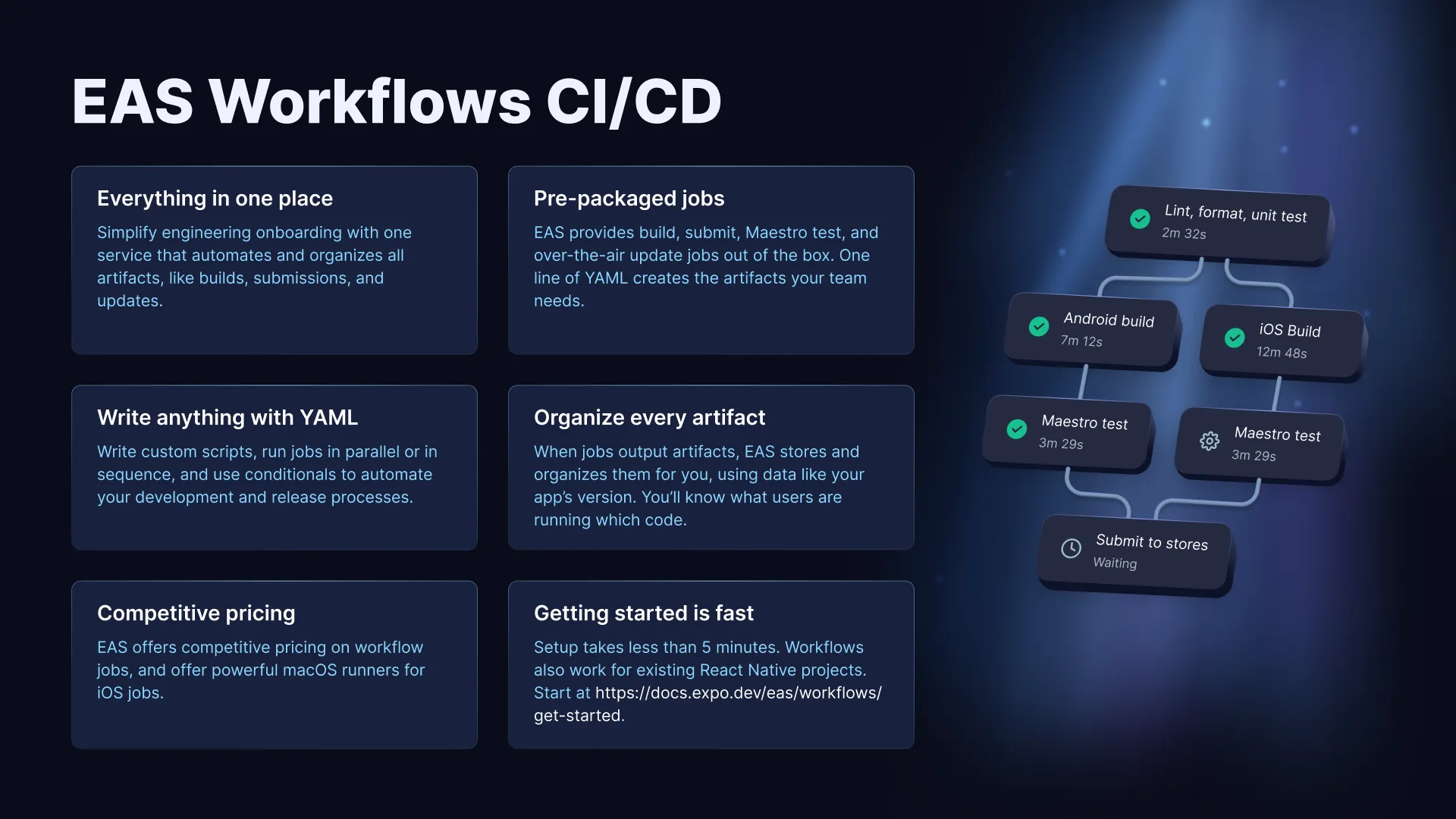
EAS Workflows CI/CD sync slide
Learn the benefits of using EAS Workflows to automate your CI/CD processes.
Additional resources
Use ready-to-use jobs to build, submit, update, test, and deploy your app.
Learn about the YAML syntax for defining workflows.
See common workflows for development builds, preview updates, and production deployments.
Track run counts, success rates, and trends for your workflows over time.