This documentation is available as Markdown for AI agents and LLMs. See the full Markdown index or append .md to any documentation URL.
This is documentation for the next SDK version. For up-to-date documentation, see the latest version (SDK 57).
BottomSheet
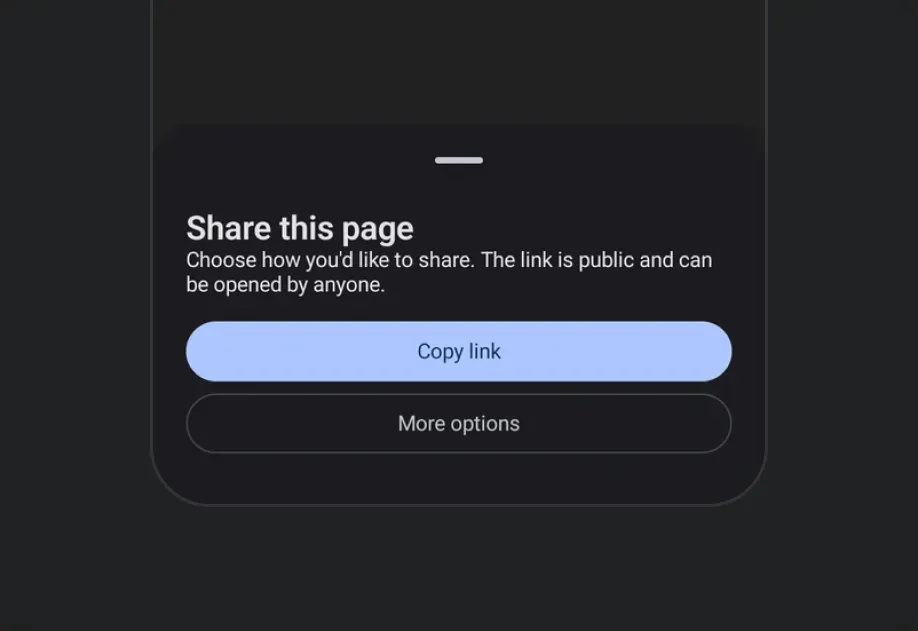
A modal sheet that slides up from the bottom of the screen.
A modal sheet that slides up from the bottom of the screen. The sheet's visibility is controlled — toggle isPresented from React state and dismiss it from onDismiss (called when the user swipes down or taps the overlay).
On iOS, to show a bottom sheet on top of another, nest the second
BottomSheetinside the first sheet's content rather than beside it. This is a limitation of the underlying SwiftUIsheetmodifier. See how to present multiple sheets for more information.

Installation
If you are installing this in an existing React Native app, make sure to install expo in your project.
Usage
Basic bottom sheet
Hiding the drag indicator
Pass showDragIndicator={false} for sheets without a handle.
Content padding
The sheet insets its content by default. Pass contentPadding to change that inset — 0 lets a row, image, or divider reach the sheet's edges.
Snap points
Pass snapPoints to let the user drag the sheet between multiple resting heights. You can use the semantic values 'half' and 'full' for cross-platform parity. The { fraction } and { height } forms are honored precisely on iOS and web.
When sheet content can be taller than the smallest snap point, wrap it in a ScrollView so the overflow scrolls correctly.
On Android,
{ fraction }and{ height }snap to the nearest of'half'/'full'— the underlyingModalBottomSheetonly supports two resting states. The partial state is only visible when content is tall enough to exceed Material's partial threshold; give the content an explicit height or fill the available space if you need the half state on short content.
Scrollable React Native content
The bottom sheet supports a React Native list such as FlatList (or a high-performance list like FlashList or Legend List) as a child when wrapped in RNHostView. snapPoints sizes the sheet, and the list scrolls within that height. With nestedScrollEnabled, the list scrolls its own content first; once it reaches the top edge, the remaining drag moves the sheet.
API
import { BottomSheet } from '@expo/ui';
Component
Type: React.Element<BottomSheetProps>
A modal sheet that slides up from the bottom of the screen.
Props for the BottomSheet component, a modal sheet that slides up from the bottom of the screen.
ColorValueThe sheet's own background color, painting its full chrome (including the drag-indicator zone and, on iOS, the home-indicator safe-area inset). When omitted, each platform keeps its own default.
This only paints the background. children are React Native views on
every platform, so they don't pick up a contrasting text color
automatically -- set one explicitly if you use a dark containerColor.
ColorValueThe preferred color for native Compose content that doesn't set its own
color. Doesn't reach a BottomSheet's (React Native) children -- see
containerColor's doc.
BottomSheetContentPaddingPadding between the sheet and children, in dp on Android, points on iOS, and
CSS pixels on web. Pass 0 for content that reaches the sheet's edges.
When omitted, each platform keeps the inset it applies by default.
Example
``contentPadding={0} — full-bleed content
Example
``contentPadding={{ top: 8, bottom: 24 }} — no horizontal inset
ModifierConfig[]Platform-specific modifier escape hatch. Pass an array of modifier configs
from @expo/ui/swift-ui/modifiers or @expo/ui/jetpack-compose/modifiers.
() => voidCalled when the bottom sheet is dismissed by the user (e.g. swiping down or tapping the overlay).
ColorValueThe color of the scrim overlay rendered behind the bottom sheet.
Pass 'transparent' to make the backdrop invisible while still blocking touches.
boolean • Default: trueWhether pressing the Android hardware back button (or back gesture) dismisses the bottom sheet.
When false, the back press does not dismiss the sheet (note: the press still does not reach
React Native's BackHandler).
boolean • Default: trueWhether tapping the backdrop (scrim) dismisses the bottom sheet.
When false, the sheet stays open until the user explicitly closes it (e.g. via a button).
boolean • Default: trueWhether to show a drag indicator at the top of the sheet.
SnapPoint[]Heights the sheet can rest at.
When omitted, the sheet auto-sizes to its content.
See SnapPoint for the supported values.
Example
``['half', 'full'] — draggable between half and full
Example
``['full'] — always full height
Types
Padding between a BottomSheet and its content — a single value applied to every
edge, or per-edge values where an edge that is left out is 0.
Type: number or object shaped as below:
A snap point describing one of the heights a BottomSheet can rest at.
'half'— Approximately half-screen.'full'— Fully expanded.{ fraction }— A fraction of the screen height (0–1). iOS / web only.{ height }— A fixed pixel height. iOS / web only.
On Android, { fraction } and { height } snap to the nearest of 'half' / 'full'.
See the component docs for platform behavior notes.
Type: 'half' or 'full' or object shaped as below:
Or object shaped as below: